In the digital age, our lives revolve around the internet. From checking emails and browsing social media to shopping and paying bills online, we interact with countless websites every day. But early in my online journey, I realized that while the internet offers immense convenience, it also comes with risks. I often clicked on links without thinking, trusted websites blindly, and sometimes fell for scams. It wasn’t until I adopted a single, simple habit that my internet awareness dramatically improved, allowing me to navigate the web safely and confidently. In this article, I’ll share this habit, how I implemented it, and practical steps you can apply immediately to become more internet-savvy.
How I Realized My Online Awareness Was Lacking
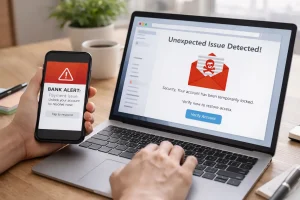
I used to think I was careful online. I avoided suspicious downloads and rarely shared personal information. But one day, I clicked on a link in what appeared to be an official email from a bank. Within minutes, I noticed unusual activity on my account. I had fallen for a phishing scam, and it was a wake-up call.
That incident forced me to reflect on my habits. I realized that I had been reactive rather than proactive. I waited for problems to appear instead of developing consistent awareness practices. That’s when I started experimenting with strategies to improve my internet awareness, and I discovered a simple, repeatable habit that changed everything.
The Habit That Changed Everything: Pause and Verify
The simple habit that improved my internet awareness is what I call “Pause and Verify.” It’s easy to remember but powerful in practice. Before clicking any link, entering personal information, or trusting online content, I pause for a few seconds and ask myself: “Is this trustworthy? How can I verify it?”
This brief pause forces me to step back from impulsive decisions. It creates mental space to examine URLs, check sources, read reviews, or cross-check information. Over time, this habit became second nature, and I noticed a significant reduction in online risks, from phishing emails to misleading websites.
How I Applied Pause and Verify to Emails
Emails were my biggest vulnerability. Scammers often disguise themselves as banks, popular apps, or even colleagues. I learned to treat every unexpected email with skepticism.
Steps I Followed:
- Check the sender’s address carefully: Scammers often use addresses that look similar to official ones, like
bank-secure123@gmail.com. - Avoid clicking links directly: Instead, I type the website URL manually into the browser.
- Look for urgency cues: Phishing emails often create panic, like “Your account will be locked!” Pausing allows me to evaluate if the message is genuine.
By applying “Pause and Verify,” I stopped falling for deceptive emails and even learned to identify subtle phishing patterns.
Evaluating Websites Before Interaction
Another area where this habit helped was website evaluation. Before, I would click on sites just because they appeared in search results or social media links. Now, I take a systematic approach:
- Check the URL: Safe sites usually match their official brand names. Misspellings or extra words are red flags.
- Look for HTTPS: A padlock indicates encryption, but I combine this with other checks.
- Read reviews or feedback: I search for reviews on platforms like Trustpilot or Reddit to see other users’ experiences.
For instance, I once found a free software download site that looked legitimate. Pausing and verifying the reviews revealed multiple reports of malware. I avoided it and found a safe alternative. This habit prevents unnecessary risks and ensures I interact only with reliable sites.
Applying the Habit to Online Shopping
Online shopping is convenient but risky if done carelessly. Before adopting my habit, I sometimes rushed into deals that seemed too good to be true. Now, I use “Pause and Verify” in every purchase.
Practical Steps:
- Check seller credibility: Platforms like Amazon and eBay provide ratings and reviews. I always read them before buying.
- Compare prices: Unrealistically low prices often indicate scams.
- Look for secure checkout: Ensure the payment page has HTTPS and recognized payment gateways.
One time, I wanted to buy a fitness tracker at a huge discount. Pausing to verify the seller’s reputation revealed poor reviews and delayed shipping complaints. I avoided potential loss and purchased from a verified seller instead.
Cross-Checking Information Online
Beyond scams, misinformation is another challenge. I noticed that sharing or trusting unverified content contributes to confusion. By pausing and verifying information, I started to cross-check news, articles, and tutorials before accepting them as truth.
Techniques I Use:
- Compare multiple sources on the same topic.
- Look for official or authoritative sites (.gov, .edu, reputable organizations).
- Verify facts with tools like Google Fact Check or Snopes.
This habit saved me from believing misleading health advice and questionable tech tips, ensuring I only use accurate and reliable information.
Protecting Personal Information
Another practical application of this habit is protecting personal information. Websites and apps often request unnecessary data. By pausing, I question why the information is needed and whether I’m comfortable sharing it.
For example, a free game app once asked for access to my contacts and location. Pausing to consider the request made me realize it wasn’t necessary for the app’s functionality. I denied access, protecting my privacy without losing the game experience.
Combining Pause and Verify with Tools
While the habit itself is powerful, combining it with online tools enhances safety. I use:
- Google Safe Browsing: To check website reputation.
- VirusTotal: To scan downloads or URLs for malware.
- Browser extensions: Like ad-blockers and anti-phishing add-ons.
These tools work alongside the mental habit of pausing and verifying. They provide quick feedback and reinforce cautious behavior.
Teaching Myself Patience Online
Initially, pausing seemed trivial, but I noticed that impulsive clicks often led to problems. By deliberately slowing down, I became more observant. This habit taught me patience online, allowing me to:
- Spot inconsistencies in websites.
- Recognize suspicious offers or pop-ups.
- Avoid hasty financial decisions.
The habit transformed my approach to the internet from reactive to proactive.
Real-Life Examples That Reinforced the Habit
Over time, I saw clear benefits. A few examples:
- Email phishing: Pausing saved me from giving login credentials to a fake bank email.
- Fake shopping deals: Verifying reviews prevented loss of money to a scam site.
- Misinformation: Cross-checking articles prevented me from sharing misleading health advice with friends.
Each incident reinforced the value of this simple habit, making it an integral part of my digital routine.
Encouraging Consistency
The key to improving internet awareness is consistency. I integrated “Pause and Verify” into my daily browsing habits. It takes seconds, but the cumulative benefits are enormous. I remind myself daily: every click, every download, every piece of information is worth a brief moment of scrutiny.
Consistency also builds confidence. I no longer panic when encountering suspicious emails or unfamiliar websites because I trust my verification process.
Conclusion: Why a Simple Habit Makes a Big Difference
Improving internet awareness doesn’t require complex tools or expensive software. A simple habit—pausing before interacting online—can drastically reduce risks, prevent scams, and ensure that the information we trust is accurate.
By applying “Pause and Verify” to emails, websites, online shopping, and personal data sharing, I transformed from a reactive, sometimes careless user into a cautious, confident, and informed internet navigator. This habit, though simple, is powerful. Anyone can start today and see immediate results.
FAQs
Q1: What is the simplest way to improve internet awareness?
Adopting the habit of pausing before clicking links or entering personal information is the most effective method.
Q2: Can pausing really prevent scams and phishing?
Yes. Taking a few seconds to verify URLs, sender emails, and website reputation helps avoid most online scams.
Q3: Should I trust websites with HTTPS?
HTTPS indicates encryption but doesn’t guarantee legitimacy. Always verify URLs and website reputation alongside HTTPS.
Q4: How can I verify information online quickly?
Cross-check multiple sources, use fact-checking websites, and prioritize official or authoritative sources.
Q5: Are tools necessary for online safety?
Tools like VirusTotal, Google Safe Browsing, and anti-phishing extensions complement cautious habits and provide extra security.